July 2020
We’ve added a whole bunch of new features on the Settings
page. See screenshot:
If you’re looking to get paid online, we’ve also integrated
with Freedom Merchants – it works for online c/card and ACH payments, USA and
Canada: both QuickBooks Online and QuickBooks Desktop. Freedom Merchants offer
the lowest rates that add up to significant savings for you.

JAN 2018 awesome new feature updates:
1. Manage
Invoices (new page)
·
Filter open invoices according to the selected number of
days past due
·
Send payment reminders listing selected invoices to
customers (the system will automatically group your selected invoices into one
email per customer).
·
Make invoice specific notes; See imported memo notes; Link
invoices to a Predefined Reason for Late Payment;
2. Select
Columns on the AR Aging Summary page – you can now hide/display any
selected column - declutter your screen, and sharpen your focus.
Note: The Dashboard page is hidden while we
continue to work on an upgrade for the dashboard page.


Updates Oct 2017
Additional options for email
templates that are used in the payment reminders:
(a)
You can now hide certain
columns in that appear in the email template table used for payment reminders.
(b)
You can choose to include
Unapplied Payments and Credits in the email template table.
Click on Email Options
to make your selections.

Select your options here:

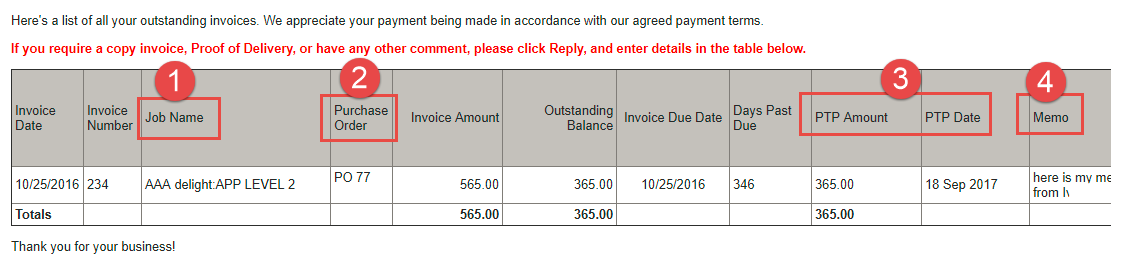
These are the columns in the
payment reminder that correspond to the above selection options.
Updates applied Sept 2017
1.
Export the AR Summary page -
Export to Excel (Click on the ”Export”
button per screenshot 1 below)
2.
View Invoices and Invoice Memo
notes. (Click on “Invoice” per screenshot 2 below)
3.
New Email Options:
a.
AR Collect will now pull through Invoice
Memo notes from QuickBooks (if you select this option).
The memo notes will then be displayed in the payment reminders that are
emailed to customers (screenshot 3)
Invoice Memo Notes will also appear in the PDF invoice that customers
receive. (screenshot 3)
b.
The “Do Not Email list” can
be filtered to display different categories of customers. (screenshot 3)
Screenshot 1
(Click on the Export button to export
the AR Aging Summary page. You will be emailed an Excel report)

Screenshot 2
View any invoice directly from AR Collect. On the AR Aging
Summary, click on any balance – the invoice list will appear as below. Now
click on the word “Invoice” to view.


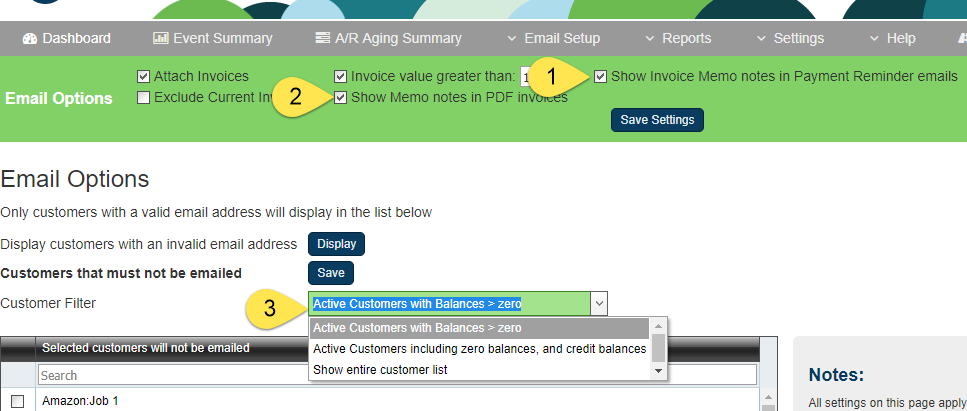
Screenshot 3
New email options:
1. Include
Invoice Memo Notes in the payment reminders email table.
2. Include
Invoice Memo Notes in the PDF invoice that is emailed to customers.
3. Filter
the Do Not Email List.

Updates applied 06 July 2017
1. The “Red List”
On the AR Aging Summary page, you can highlight customers that you need to
focus on, and filter the AR Aging Summary using the “Red List” option.

2.
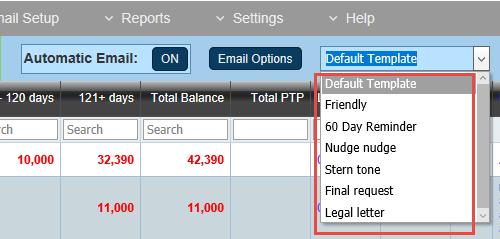
Email template names are now customizable.
Go to Email Setup | Email Templates to
rename your templates.
3. Event Summary Page now has additional functionality.
a. Filter
or search
b. Mark
Actions as completed, or uncompleted, and then filter them
